Using QR Codes – The Right & Wrong Ways to Use Them

QR Codes are all the rage today in many industries – in particular the real estate business. More and more companies are using QR codes to engage consumers and help promote their products. If you don’t know QR Code are two dimensional barcodes that are gaining a lot of traction for marketing as they can be scanned by an appropriate app on a smart phone which gives access to hidden information or a link to a webpage.

However, due to their popularity and as QR codes are being printed everywhere, perhaps now is the time to take a step back and look at the right and wrong ways to use QR Codes.

The Right Way

1. Use them in your print marketing campaigns – Do you advertise in magazines? Use flyers, posters or physical banners? Include a QR Code on these to add another level of marketing to drive traffic to your online presence.

2. Have your QR Code link to a mobile optimized page – QR Codes are being read by smart phones so, shouldn’t the web page that users are directed to be a mobile optimized page?

3. Use QR Codes to give users “something extra” – this is clever marketing indeed! By giving someone something “extra” by finding and scanning the QR Code it makes them feel special and can make them feel more inclined to use your services or buy your product.

4. Think of unique ways of using it where people have their phones – if you are in the real estate business, perhaps think about putting a QR Code on a lawn sign in front of a property if the property is in a walkable neighborhood – have the code link to the property listing page! Or how about having one on your stationery? Some people have even had them put on their cars!

5. Educate people – QR Codes are still new technology and not everyone knows what they are – perhaps include a line under it saying “Scan this QR Code with your smart phone” just to show people it will scan for them.

The Wrong Way

1. Using a QR Code on your website – People want to click on a link and are unlikely to scan a QR code which is on your website. QR codes are being scanned by smartphones which have mobile browsers and small screens, so keep this in mind.

2. Generating bar-codes with too much information in them – The more information you have in a bar-code the higher the density of black squares meaning that it is more likely that someone will not be able to scan the QR Code at all making it definitely a wasted effort.

3. Linking to your main website homepage – while not terrible, this really does defeat the object of using this kind of marketing. Users who have bothered to download an app and scan a QR Code want the relevant information immediately and not to then go through your entire site to find what they are looking for.

4. Printing QR Codes too small – people sometimes try to shrink them on their print marketing to save space, but be careful, if the code is too small it might not be scanned. Spend time testing and experimenting before sending your code to print.

One bad example of use is using it on a television commercial which has been reported, the code will not be on screen long enough for someone to get their phone out and scan! Poor use of QR Codes aside, they can be used very successfully in your marketing strategy if thought goes into their implementation.

An exciting possibility these days is where people are using QR Codes on their business cards but these days perhaps business cards are becoming a thing of the past? Check out http://www.qbizmo.com/ launching soon for more!
Why iFrames For A Property Search Page On Your Site Is A Bad Idea

First it is prudent to give a little potted history of the web and the use of iframes.

When the web was starting out most pages were just text pages. Browsers were text based and the use of graphics as we see today was a futuristic dream! After the arrival of Windows 95 (which really kick started modern computer usage) users became more used to a Graphical User Interface (the GUI) meaning that web browsers had to catch up. Do you remember Netscape Navigator? That pioneered an age where the web was no longer text based but now allowed graphics, colors and shapes.

Now, from this grew the use of frames, frames are a way of piecing together a single web page referencing several web pages to make up that page. The use of iframes grew from this. Today iframes, while an older technology are  still often used as a way for presenting content from another site within the framework of your site. In the case of Real Estate agents – property search pages are often framed in when using an older web site or search technology. Which is generally a bad idea for Realtors and their business.

From the user perspective iframes serve up the required information as you want them to see it, so where is the issue? Well, as the business owner you want to be able to track a user on a site and make sure that you keep their attention to your site as much as possible. Using iframes does not allow this to be done. Imagine the scenario where you go to a Real Estate site and go to a property search page with an framed search function. Suddenly when you click on the search results you are redirected to the individual listing which is an UNBRANDED property page. That is a problem – unbranded property search pages are common and once you have a potential client in to those unbranded pages you have effectively “lost” them from your site.

Those unbranded search pages often have their own menus which of course do not correspond with pages on your site;it’s the unbranded property search. So, in essence you are now unable to track a visitor who has come to your site!

Also many of these iframed property search pages also have the capability for visitors to sign up for email drip programs which will be from that system and not from perhaps the intended system you wanted. These emails will again likely be unbranded and could drive the visitor to other pages. Asides from the extra complication, by this time the visitor has likely forgotten about your site and contacting you!

The iframes therefore have several knock on effects – analytics will suffer, page count will suffer and time on your site will suffer and all of these important measures are used to track the profitability of your site. You can’t manage what you can’t measure.

So, what is the solution? An integrated property search solution that creates dynamic pages within your sites framework and architecture. All of the sites that Arranging Pixels develops use this method which allows better tracking of visitors, looks better due to continuous branding and helps people stay on your site longer.

Using Social Networks Effectively For Your Business

It has been noticed across all industries that Social Networks and Social Media can be used to help promote a business and naturally increase its sales through a more subtle type of marketing.

Why Should You Add A Facebook/Twitter Icon? What Benefits Do I Get?

If you read out post “5 Reasons Why Your Business Needs a Facebook Page” then you understand why you need to set up a Facebook page for your business so that you can improve your SEO, Build Customer Loyalty and of course keep customers up to date on your business and its activities. Adding a Facebook icon will allow your site visitors to click to an extension of your brand – your Facebook page.

Twitter of course works in a similar way to Facebook, you “Tweet” updates and allow people to “follow” you and interact with you almost instantaneously. In fact, there have been many controversial news stories involving information released through twitter to the public. So it is indeed a powerful marketing tool when used in the right way to get your message out there and heard.

In fact there has been an increasing trend whereby consumers leave comments reviewing a certain company and their products or complaining on their Facebook and Twitter pages. So being active in your social media can definitely help build a personal relationship between you and your clients.

How Do You Promote Your Social Media Outlets On Your Website?

Using phrases like “Join Me On…” can be a great way to engage a potential customer when combined with a recognizable social networking logo. There are often many different styles of logo these days for each social network. Using the most common version of a particular social media websites logo is often the best practice as it ensures that people will immediately be able to recognize that it relates to a particular site. Consider also how big your social media icons should be.

Where Should I Place My Social Media Icons?

You want to ensure that the placement of the relevant social network icon is both subtle, yet prominently placed as a Call To Action item for people to interact with your business. Think of it as no different to placing an advertisement on your site. You WANT people to click on it and not ignore it.

Of course if your social media icons are buried deep in your site or not in a easy to access place then your efforts to create your own social media following are definitely at a disadvantage. You always want to make sure your icons are “above the fold” – that is in a location which is immediately seen when your homepage is loaded.


5 Reasons Why Your Business Needs a Facebook Page

Businesses across all industries are now jumping on the Facebook Page bandwagon to establish their online identity, and your company may need to follow suit. As more of your prospects and existing customers become avid Facebook users, having a Facebook Page can help you connect with a whole new group of people and establish some positive relationships. Facebook Pages for businesses are free, and in most cases, take less than an hour to set up. You can even customize your page to include your logo and banner, and create a custom “landing” tab page to highlight a special promotion, sweepstakes or other marketing message.

Here are five reasons why your business needs a Facebook Page:

#1: Keeps Your Business on “Top of Mind”

Since updates to your Facebook Page get pushed out to your fans’ News Feeds instantly, you can indirectly market your business and links to your website – and all for free. Doing this consistently will help to keep your company and brand at “top of mind” for many of your prospective clients. When a client is ready to buy, they may be more likely to get in touch with you just because you’re easily accessible within a few clicks!

#2: To Improve SEO

Google does index Facebook Pages fairly quickly – just make sure you set the settings to “Public”. This can help you capture top listings for certain keywords and phrases on Google, and makes it easier for prospects to find you.

#3: Free Indirect Marketing

If you struggle with reaching out and connecting to your target market, you can use Facebook Pages as an indirect marketing tool to generate business. People don’t like to be bombarded with advertising or marketing messages through email or even direct mail on a regular basis. Fortunately, the psychology behind Facebook marketing is a little different. Your fans have opted in to hear from you. Many will be happy to hear about a special offer, news or your latest blog post.

#4: Fans Can Check In to Your Business

When you have a brick-and-mortar business that attracts foot traffic and relies on in-person sales, some customers may want to “check in” to your establishment using the Facebook Places feature. When they do this, they are sharing their current location – and your business name with the linked Facebook Page – with all of their Facebook Friends. It’s free advertising for you and can help to further establish your online presence.

#5: Builds Customer Loyalty

Staying connected with current and future customers with a Facebook Page can help to open up the lines of communication and also make you appear more accessible. Accessibility is key when it comes to marketing and branding. After all, customers are more likely to do business with someone they can reach easily and someone they can trust. Be consistent with your Facebook updates and find ways to generate buzz about the latest happenings. Interact with people who post comments on your Facebook Page so that you can build some positive relationships. These relationships may be critical for building your client base now, and in the future.

7 Free Ways to Promote Your Website or Blog

Now that you have a beautiful, professional-looking website or blog set up, you need to make sure your target audience can actually find it! Having a website or blog go “live” on the web isn’t enough to make these marketing vehicles work for you. You need to take steps to proactively market and promote your URL, or potential customers won’t be able to find you easily. Even if you’re ranking high on the major search engines for certain keywords and phrases, there is an even bigger pool of potential clients and customers out there who can reach your site without using a search engine.

Here are seven FREE ways to promote your website or blog, and start generating more traffic:

  1. Set up a Facebook Page. Create a complementary Facebook Page for your business and make sure to include details about your website and blog on the Page “Info” section. You can promote individual links as updates on your Wall, and can also interact with commenters and fans regularly. This is a free Facebook service that can help businesses across all industries.
  2. Comment on other blogs or Facebook pages. Post comments on blogs relevant to your industry or services, and make sure you link back to your website or landing page when asked to enter personal information with your comment. If you’re on Facebook, make sure to “Like” other businesses in your niche or industry, and leave comments or posts on their Wall occasionally. This can help to generate some buzz and encourage other people to look at your Facebook page, website and blog.
  3. Exchange links. Seek out links to websites and blogs that have similar interests as you and offer to link back to them in exchange for a link. This can be a simple and effective way to attract more traffic.
  4. Add your URL to all marketing materials. Many small businesses overlook the value of this simple concept, and fail to attract hundreds of potential visitors to their site or blog as a result. Make sure you include your URL in all of your marketing materials – this includes business cards, postcards, posters and any direct mail pieces you send out regularly. Make it as easy as possible for potential customers to find your site’s address!
  5. Submit your site to niche directories or local listings sites. Get listed on major niche directories by submitting your URL through the contact form. Some local listing sites offer a “free” option, and this can be very helpful in getting you noticed by your target market.
  6. Publish press releases on your site, and online. Post press releases about newsworthy events and items related to your industry at least once per month. Press releases that get sent through the newswires need to include a link back to your website. This is a great way to get more exposure and increases the chances that potential customers will find you.
  7. Promote your website or blog on Twitter. Twitter is a great social networking tool for promoting your business and establishing your online presence. Set up an account and post relevant updates regularly. Follow people in your niche, work on building a following, and post links to your website and blog content so that people can click through to your site directly.

Landmark Real Estate Center makes a mark with new website

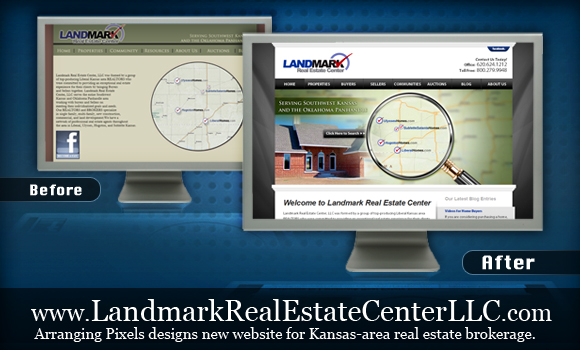
We are excited to announce the launch of the new collection of websites for the Landmark Real Estate Center.  Arranging Pixels designed, built and developed an new Custom Multisite WordPress for the main corporate Landmark Real Estate Center as well as 4 sites for the various locations throughout Kansas.

  • LiberalHomes.com
  • UlyssesHomes.com
  • SubletteSantanaHomes.com
  • HugotonHomes.com

This multisite installation allows the corporate staff to assign users to each of the subdomains.

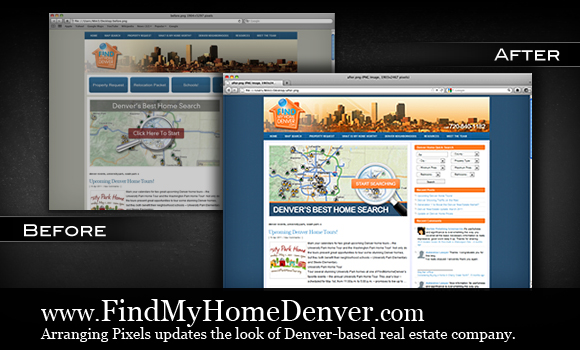
Facelift improves conversion at FindMyHomeDenver.com

When Drew Armbruster approached Arranging Pixels last month he was faced with a dilemma.  He had spent a ton of money on building a WordPress website, but he was not seeing the conversion rates he had hoped for.

After reviewing the website analytics and conversions for a few weeks we knew exactly what FindMyHomeDenver.com needed.  A simple facelift!

The facelift included:

  • Fresh new color palate to match the logo
  • Clearer call to action buttons on the homepage
  • A reduction in the number of navigation choices
  • Relocating the navigation to a more intuitive place.

We relaunched the new FindMyHomeDenver.com just over a week or so and Drew is  a happy camper… in fact he said “the site has been doing amazing since you finished the new look!!”

If you’re looking for a home in Denver- take a look at www.findmyhomedenver.com and give Drew a call!

5 Basic Rules for Great Web Page Design

Your website is one of the most powerful marketing tools you can have for your business. You need to not only make sure the page design and layout are visually appealing, but also ensure that your site visitors stay on the site for more than a few seconds. If the text is too small or the colors you choose don’t complement each other, your website visitor could disappear in the blink of an eye.

Working with a professional web design company or specialist can increase your chances of having a high-quality and attractive website, but you may still be responsible for making some key decisions about the overall look of the site. Here are just five basic rules for great web page design to keep in mind:

#1: Navigation

Your website visitors need to be able to jump from page to page with ease. Make sure that all of your hyperlinks are linking out to the correct landing pages, and that any graphics and images are linked appropriately. Your header navigation – the lineup of pages under the address bar – needs to include your key pages.

#2: Readability

Use simple language and make sure the text size isn’t too small – or too large. Align the text so that it stands out but doesn’t overpower your website. Make sure all graphics with text are easy to read, and that your visitors can “scan” the copy easily to get the main idea.

#3: Search Engine Optimization

You will need a website that is optimized for the search engines. This means that it’s designed and coded in a way that will attract the attention of search engine web crawlers and can get indexed easily. You’ll also need to promote your site online using different types of online marketing strategies. Consider working with an online marketing company or a consultant to make sure your website is optimized for the highest possible search engine rankings.

#4: Consistency

Your company logo, the color of the text, size of pictures and any special text formatting you use needs to be consistent throughout your site. This helps to create a professional appearance and will create a better user experience. Make sure you are begin consistent with all fonts, images and text attributes you use, even when each page is customizable.

#5: Download Speed

If it takes too long for your web pages to load, your website visitor may just leave your site and go to your competitor. Overloading your site with too many graphics, media-rich files and animations can bore your visitors and prevent them from even getting to a landing page, product page or contact page. Make sure you consider page loading times when selecting a web page design or layout. Stick with simple and clean layouts to ensure a speedy download time.

WordPress Video Library

Are you an existing Arranging Pixels client with a WordPress website?  Maybe you’re just thinking about building a WordPress website… or you’ve built one with another company and they’re just not supporting you…

If you’d like to learn more about WordPress then this collection of videos is for you!

Add an image from your Computer

Add Heading style to a Post or Page

Add Image from URL

Add Links to a Sidebar

Upload Media to the Media Library

Add New Page

Add New Post

Add Paragraphs to Posts and Pages

Introduction to the WordPress Admin Bar

Approving and Editing Comments

Working with Categories

Change Password on the Your Profile Page

Introduction to the WordPress Dashboard

Delete an Image from a Post or Page

Edit Image in a Post or Page

Editing Posts or Pages

Edit Links

Introduction to Post Excerpt

Set Featured Image for a Post or Page

Creating Hyperlinks

Introduction to the Image Editor

Introduction to Link Categories

Ordered and Unordered Lists

Introduction to Media Library

Embed videos, images and media

Paste from MS Word into Posts and Pages

Working with Quick Press

Replace images in a Post or Page

Restore Page from Trash folder

Restore Post from Trash folder

Working with Tags

Introduction to the visual editing toolbar

Trash a Page or Post

Using the image editor to crop or scale

Using the image editor to rotate or flip