How important is design?

Design has had a powerful impact on everything from products to websites during the last couple of decades. Going beyond what can be seen, design can be thought of as an additional communication medium. It allows perceptions to be shaped without saying a word. Great design is as simple as it is intuitive. But, what exactly is the impact of design in business?

Why Design Matters

According to Adobe, companies that focus on design have outperformed the S&P Index by 219% during the last 10 years. This means that businesses big and small can reap the same benefits by putting design first. But, these benefits will only be apparent if companies fully commit to this approach. With design emerging as a competitive advantage, businesses that lead with design are already seeing the rewards. Walk into any Target location and this design first approach is clear. Target can get away with charging more for products because of their emphasis on design.

Design creates an identity

A company’s design aesthetic is as important as it’s customer service. From the choice of colors, to the use of imagery, every element comes together to form the foundation of a company’s brand. This identity allows businesses to attract the right customers and communicate a lot about the company before a single transaction takes place. When done right, businesses can rely on their branding to help attract new customers.

Web Design

As more people turn to the web, designing a great web experience has become the central focus for many companies today. Companies need to build fluid and visually appealing websites that work well on everything from desktops to mobile phones. Design engages visitors, increasing traffic and keeping visitors on site longer. Each element on a well-designed website should have a purpose and drive visitors to take action.

Large and small companies alike are already proving that design matters today more than ever. Companies that are able to incorporate design first ideology will have the greatest competitive advantage in the digital age.

3 Powerful Ways to Elevate Your Brand

Your brand is a vital part of your business, allowing you to leave the right impression with clients. Even the subtle nuances of your brand can communicate a lot about your company. With branding having such a powerful impact on client behavior, it’s important continually build your brand and invest in its growth. Here are 3 powerful ways to elevate your brand.

Create an Experience

Every interaction with a client is a chance to leave a positive impression and create a memorable experience. A little bit of time can go a long way when crafting your client’s experience with your brand. Companies like Apple have perfected their brand experience by carefully examining every interaction. This is evident from the second you visit an Apple store, all the way through opening up a new Apple product. Creating your brand’s experience starts with viewing your brand through your client’s eyes. What is your client’s first interaction with your brand like? Your brand’s experience should be consistent every time and true to your brand’s values. If you are able to create a great experience for your clients, they won’t just mention your brand, they will become brand advocates.

Be Consistent

Brand consistency not only makes you look professional, it also helps you stand out to clients. This means the same colors, imagery, and logo, no matter if it’s online or print. Clients should be able to easily recognize your brand even if it’s a quick glance. Studies have show people default to brands they easily recognize (while all other things are equal). This is why big brands like Coca-Cola keep consistent design elements from their bottle to their social media. But, consistency goes beyond just design. Brand consistency also should extend out to all elements that represent your brand. When a client calls versus when they visit you in person, do they get the same level of customer service? Consistency helps shape perceptions and protects your brand.

Stay True to Your Brand

Clients can easily connect with brands that are authentic, open, and true to their values. Nothing is worse than deceiving clients by straying away from your brand’s core values. Clients not only appreciate honesty, they expect it. Today, people want to deal with brands that make authenticity their priority. This transparency creates a strong trust between you and your audience. Strive to tell your company’s real story, and bake values into your brand that will guide the future actions of your company. If you sell products, be true to why the product was created and who it is for. Authenticity communicates to clients what you brand is and isn’t willing to do. Let your values resonate with your clients, and they will keep coming back to you.

Focusing on your brand’s experience, consistency, and authenticity, will easily help elevate your company’s brand. Start small and build on top of the progress you make. The more you invest into these principals, the more valuable your brand will be to your clients.

5 Ways to Get More Leads

Everyone wants more leads! But, it can be hard to get the phone ringing without a lead generation plan in place. We’ve outlined 5 strategies you can put into place today to get more leads and increase your reach.

Blogging

You are an expert in what you do. So why not share some of your expertise on your blog? When search engines like Google index your site, they are able to pick up on the keywords in your blog posts. This helps you get found for specific keywords that are related to your industry. This is the basis of modern Search Engine Optimization (SEO). The more blog posts you write, the more value your audience will attribute to your site. Who doesn’t want to keep going back to a site that provides them with real value? As your site establishes authority, you will see more and more people filling out the lead capture forms on your pages.

Videos with email capture

Creating video is a great way to show your industry knowledge and expertise. But, most of us let visitors off the hook after they are done viewing a video. Wistia is a video hosting site that allows you to embed your videos directly on your site with a lead capture form built into the player. Offering free and paid plans, it’s easy to get setup in a matter of minutes. If visitors are viewing your videos, they are more likely to enter their information in your lead form. Wistia also integrates with a majority of the CRM’s as well.

Email marketing

Every time you capture a lead’s information, you will want to add their info to either a content management system or email marketing service. Make sure you have their consent with a box that authorizes you to contact them for marketing purposes. Tools like Insightly or MailChimp both offer free ways to send out emails to your list of contacts. If you are emailing your leads on a regular basis, you will be able to establish credibility and stand out in your industry. In every email you send, you will want to offer easy ways for your leads to reach out to you.

Social media

You might already have a social media presence, but are you actively using it to get more leads? This means creating content for each social media platform with links to your site or blog posts. Get your audience involved by asking questions and taking the time to respond. You can also hold contests to further increase engagement and drive action.

Events and Webinars

Holding an in-person event or webinar can be one of the best ways to drive new leads. It’s important to provide quality information or cover a specific topic that will attract your audience to your event. Sites like Eventbrite will allow you to plan and organize your in-person events, while being able to collect your attendee’s information. For Webinars, Join.me makes it simple to hold free webinars with a few clicks.

Bonus

Your website should be a lead generation machine, operating 24 hours a day, 7 days a week. But, sadly many websites were not designed with lead generation in mind. This means having strong calls-to-action and thoughtful lead capture forms. This also means having a site that provides real value. Much like your blog, your pages should be purposefully built and designed for visitors to take away information that is helpful to them. Today more than ever, your site needs to to be optimized for mobile. With a larger amount of daily traffic coming from visitors on their phones, mobile optimized sites present an opportunity to turn mobile visitors into interested leads.

These are just a handful of ways you can get more leads. With the combination of everything outlined, you will be able to exponentially power-up your lead generation funnel.

Over 100 Placester powered KW websites!

In June, BrandCo launched its 100th Placester powered KW website! That’s 100 fully responsive, beautifully designed, lead generating machines! We couldn’t be more excited, since each of these new KW Website Refreshes are helping agents grow their businesses right now. As the first Placester Certified Partner, we have been honored to help agents from the very beginning of transition process.

Although every website we build is dear to our hearts, we wanted to highlight just a few here. In no particular order:
 

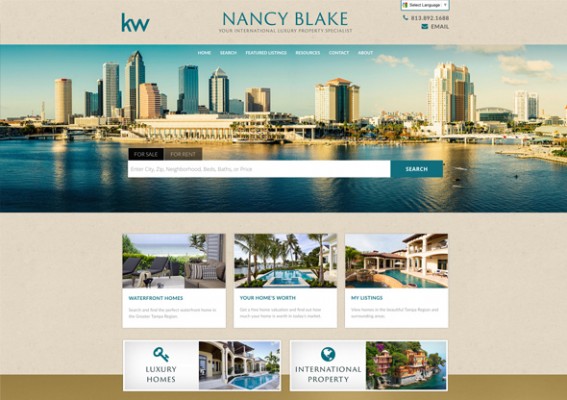
Nancy Blake

Nancy Blake’s website features gorgeous imagery of Tampa, while elegantly showcasing listings. The site functions as well as it looks with strong calls-to-action that help drive more leads while integrating flawlessly with the site.

KW Custom Placester Website
 

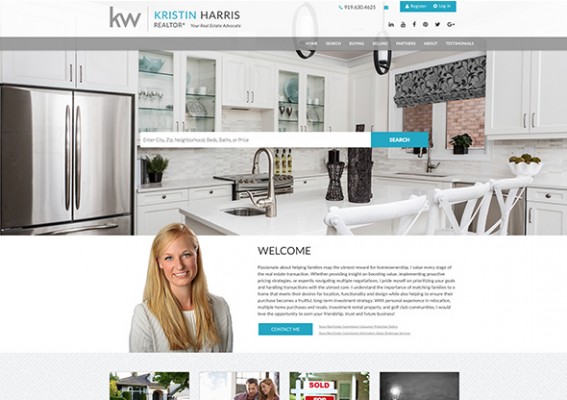
Kristin Harris Realty

Kristin Harris Realty features a clean design with prominent links to social media and quick access contact buttons. Additionally, featured testimonials help add credibility and prominence to homepage.

KW Placester Website
 

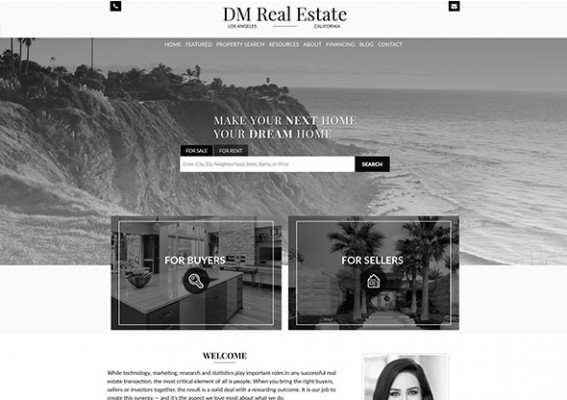
DM Real Estate

The first thing noticeable when visiting the DM Real Estate website is the sharp use of black and white photography. A splash of color is introduced when hovering over the quick access links that utilize distinct imagery for both buyers and sellers. Featured listings pop even more with full-color imagery against a white background.

Keller Williams Placester Website
 

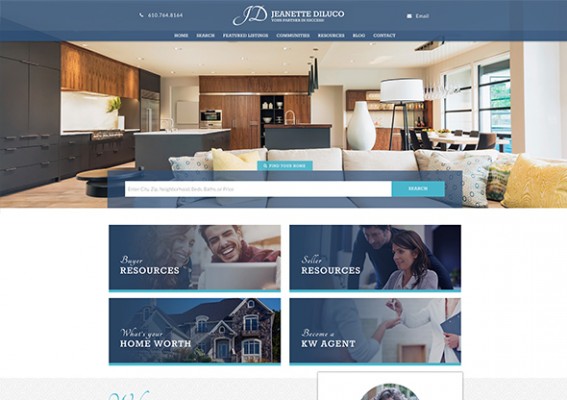
Jeanette DiLuco

Jeanette DiLuco’s website guides visitors straight to important resources with stylized image buttons that sit right under the home search bar. Jeanette’s contact and social media information can be easily seen right on the home page, allowing visitors to quickly get in touch.

Keller Williams Placester Site
 

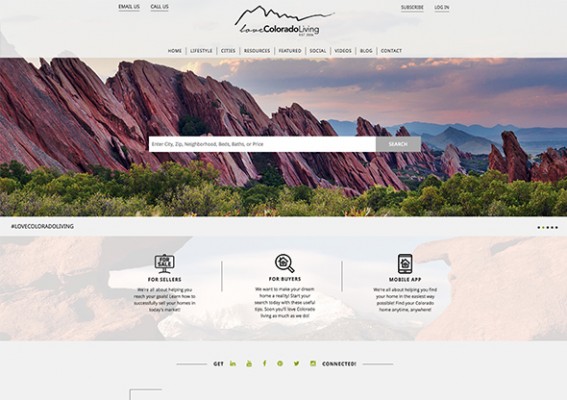
Love Colorado Living

Love Colorado Living features a large slider behind the home search bar that effectively uses local photography. Below, visitors can quickly find an area they are interested in with links to specific communities. With an embedded video on the homepage, visitors can view monthly updated videos that help drive more leads.

KW Placester site
 

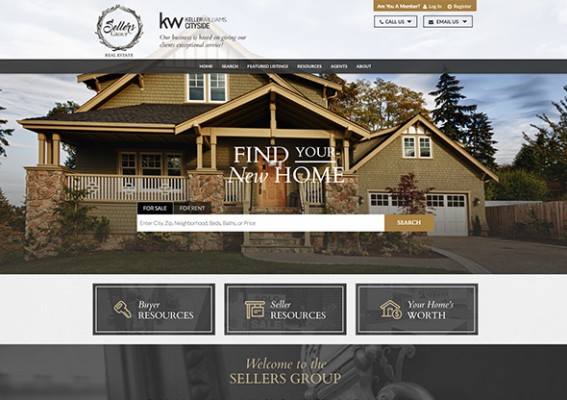
Sellers Group

The Sellers Group features a modern design that helps visitors navigate the website with ease. Key parts of the site are easily accessible from the homepage with one click access. Each agent is featured on the homepage to prompt visitors to easily contact an agent.

Keller Williams Market Center website Placester
 

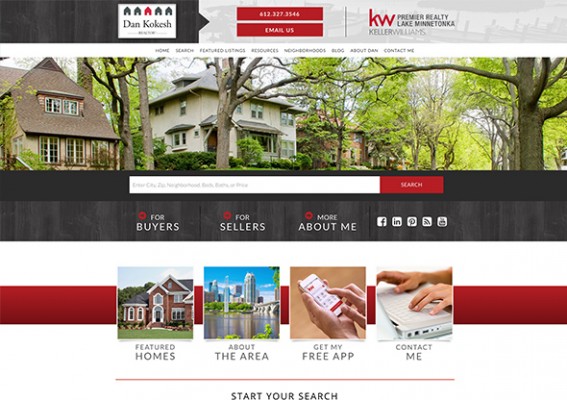
Dan Kokesh

Dan Kokesh’s site makes it easy to reach out with quick contact links featured directly in the header. The website also makes it easier for visitors to find a home with easy-to-navigate search categories.

Placester KW site
 
Those are only a handful of the KW Website Refreshes we have gotten to work on since the beginning. BrandCo has been helping KW agents with their websites for over 17 years. In fact, BrandCo has customized and built over 1000 websites for KW agents since the company started! With the new KW websites powered by Placester, we look forward to even more great websites ahead. You can get started with you refresh by visiting the KW Website Refresh page. Here is to the next 100!
 

How to Properly Use Content Curation Sites

Subscription websites that regularly offer up content are becoming more and more common. So common-place that we decided that it would be to everyone’s benefit to cover the best ways to make use of these services and what to avoid.

One website of interest would be Keeping Current Matters, which provides many real estate agents with great content. This site gives you a website that allows you to compile articles within.

What to Avoid

As tempting as it seems, try your hardest to avoid the most common mistake with these kinds of content curation websites. This would be copying and pasting the content into your website, expecting to earn SEO from it. As we have discussed before, you do not want to take content from another website and use it on your own because it can negatively affect your search engine optimization.

On Keeping Current Matters, you have no idea how many people have grabbed the content and used it on their website. You want all content that you put into your site to be as unique as possible. So, what do we suggest?

Be Inspired

While we are discouraging you to -take- the content that you’re given from a content subscription website, there is definitely still a reason to get their content. Use it to your advantage and let the great articles from these websites guide your blog post and page inspirations.

As we all know, it is very important for your content to be unique in order to search engines to rank our pages higher in the “Search Engine Result Pages” or SERPs. So, whenever you can be inspired by someone else’s writing, but able to put your own spin on it, you’re way better off.

Conclusion

Often I do this for my own work…believe it or not, it’s not always easy to think of things to write about. However, if I find something useful, I want to make it available to those of your reading our blog posts. Yet, a lot of articles I read and understand, are more technical, I want to make those on Brandco.com a lot easier to understand. Making the information that I understand available to more people. Win-Win, right?

Exactly, This is exactly what your website is geared to do. Make the information that -you- understand, easy for your audience to understand. Break things down. Always think about your audience -and- search engines. Write in your own words and appeal to your audience and you’ll always have a successful website.


Completely free stock images for your site or blog

Completely free stock images

One of the often overlooked parts of a website is the use of great photography. Whether you are building a new site or adding photos to your blog, it can be hard to find that perfect photo. Web design companies typically use stock photography sites or have an in-house photographer, but this is too costly for most individuals. You also don’t want to turn to Google Images and grab just any photo, since most images are copyrighted.

So, how can you find great photos for free? Well, you are in luck, because we’ve put together 5 great websites for finding best free stock images for individual and commercial use!

Completely free stock images Pixabay
Pixabay
One of our overall favorites here, Pixabay rarely fails to deliver high-quality photos that span a variety of topics. We would go so far as to say that it can take on many paid stock photography sites! Pixabay features thousands of photos, vector images, and even illustrations.

Completely free stock images Pexels
Pexels
Pexels is another favorite, with a fantastic selection of different photos. We like the smart categories that make it easy to browse through topic-specific collections based on popular topics. Pexels also has an interesting “Browse Photos by Color” selector that lets you find photos based on the dominant color of the photo.

Completely free stock images Unsplash
Unsplash
Unsplash offers collections of photos that differ from a lot of the stock photography websites in couple of key ways. The overall feel of photos are more natural. Unsplash also features a lot of great photos for offices, landscapes, and specific subjects that have less of a stock look. With 10 new photos added just about every week, Unsplash is constantly growing.

Completely free stock images stockio
StockSnap
StockSnap is great with its easy to use interface and search. You will be able to find a wide array of photos without much digging. We especially like the stats under the photos while browsing.

Completely free stock images Flickr
Flickr (CC0)
Lastly, we have Flickr. In the same way you have to be careful of grabbing a photo from Google Images, the same applies to Flickr. But, Flickr makes it easy with its “Public Domain” category. Here you can browse without worrying about copyright infringement or attribution credit.

That wraps up our list of sites that feature completely free stock images. There are a ton of websites that we did not get to mention here, but make sure to be aware of any copyright restrictions when downloading photos for use on your site. As a general rule, you will be safe to use images if they are public domain or Creative Commons Zero (Commonly seen as CC0). That means you can use them for your website, even if you are making money from your site. You can learn more about CCO on the Creative Commons page.

Choosing the right size photo

One last note when working with photos on your website. Whenever possible, you will want to use the smallest photo possible so your page loads fast and the photos don’t bog down your visitor’s browser. That means typically for a blog post, you will want to use smaller photos (around 500 – 950 pixels wide) depending on your website’s layout. Header images can be a lot larger (around 1080 – 1250 pixels wide).

Completely free stock images size

Rarely will you want to use the original photo size on your website. The great part of this list is that a lot of sites will let you choose a size or even type in the exact size you want your photo to be. Downloading the right size photo for your application will keep your website fast, while providing a great experience for visitors.

The new Keller Williams websites – Everything you need to know

Your New Keller Williams Website

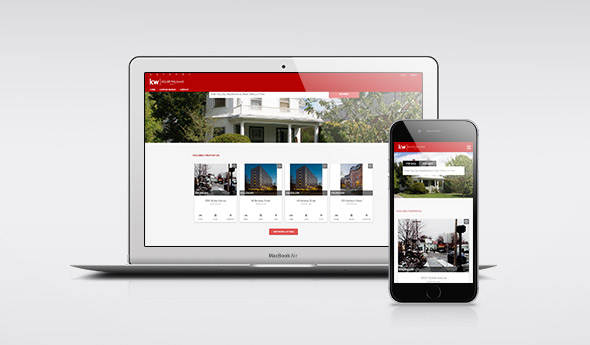
Late last year Keller Williams announced the transition to the next generation of Keller Williams websites powered by Placester. As part of the KW technology package, every KW agent will be getting one of these new websites, before the current eAgentC websites are phased out at the end of 2016. The new KW websites are built around showcasing agent’s own listings and providing an easy way for visitors to search the MLS, all while being completely responsive.
New KW website

The design of the new Keller Williams website has come a long way since the release of eAgentC. The new websites powered by Placester look great on every device, feature a built-in IDX, and improve lead capture. This means the new sites adjust to every screen size from phones, to desktops, and everything in between. Out of the box, the new sites also include options to add social media links that are prominently featured. Each site will have the standard KW branding, but can be customized to add an agent’s branding. Approved vendors (such as BrandCo) work directly with the site’s core to even further customize the sites, allowing for a fully branded look and feel. Take a look at the FAQ below to learn even more about the new KW websites.

What technology powers the new KW websites?

The new KW sites are built by Placester. The Placester platform will replace the eAgentC websites, while still connecting to eEdge. Leads can alternatively be forwarded by email if you choose to use another CRM.

What will happen to my current KW website?

If you have an eAgentC website provided by KW, it will be phased out and replaced by your new KW website powered by Placester. If you have a responsive design completed by BrandCo we can help migrate your brand to the new platform. Reach out to one of our account managers to talk about the transition.

How can I customize my new KW site?

The new KW sites come with some basic customization options in the administration area. For a truly branded website, we can help. Take a look at our Placester Responsive Refresh options.

When will I get my new KW site?

KW is rolling out the new sites in multiple phases starting April 11th, 2016 through June 2016. The rollout schedule is being continually updated and can be found here: Rollout Schedule

I have a custom domain, what happens now?

You can point your custom domain name to your new KW website by editing a few things in your domains DNS.  Our team can help you with this if you get stuck.

How do I access my new KW site?

You can log into your myKW account to access your new site. Go to “Technology”, then click “New KW Website – Agent”.

Who is the IDX provider with the new websites?

The new IDX provider is Placester and will replace your previous IDX provider. Unless you would like more flexibility with your IDX, BrandCo can provide additional options via the PiggyBack Blogs platform.

Does Placester cover my MLS?

Placester covers about 95% of MLSs throughout the US and Canada.

If I have multiple MLS’s, can I have multiple IDX searches?

Currently, your new KW site will only have one IDX integration. KW plans to include the ability for multiple integrations for a site in the future.

Is there a cost for the new KW sites or any other fees?

There is no cost for the new KW sites, as they are included in you monthly KS technology fee. You can upgrade the basic Placester site to the Placester Pro Site for an additional cost. The features included in Pro Site can make a big difference in your lead capture.

What about the stuff I have on my current KW website?

If you added original photos, text, or blog posts to your current website, you will want to add them to your new Placester site. Unfortunately there is no way to automatically send everything over at this time. BrandCo has several packages to help you transition if you do not want to do this yourself.

Where can I get support for my new site?

Placester provides phone support: 800-713-8068
Support via email: kw-support@placester.com
24/7 support via the self-help center

We are continually updating this post to reflect changes, additions, or any other insights on the new sites.

Building a website your visitors will love

Building a site that your visitors will love can be a lot easier when you keep in mind a few important principals. A great site incorporates professional design, has purposeful content, and is easy to navigate. Together these principals lead to higher conversion rates and more leads.

Real estate website conversion rate

Great design means better conversion

Time and time again agents have reported seeing an increase in business after redesigning their website. This makes sense, as great design supports a better user experience. If a website visitor can easily find what they are looking for, they are more likely to reach out to you and view you as an expert. As a real estate agent, you want visitors to be able to search for listings easily and without much effort. Mark Slade, a BrandCo client and KW agent, recently stated in New Jersey REALTOR® Magazine, “…I was hearing from consumers that they didn’t want to go through the motions of using the IDX setup to drill down and answer a lot of questions”. That is why Mark added buttons for each town in his geographical area right on his homepage. This simple design element allows users to quickly navigate to a town without digging around.

Making it easy to find the right information

The minute a visitor lands on your site, you are up against the clock. According to research, visitors will leave your site in as little as 10 seconds if they don’t see a clear purpose and the value a page provides. This is why it is imperative to create pages that have a defined purpose. Create pages that center around one topic or one line of logic. For example, you could create a page focused on schools in a specific area. With a single focus, search engines can more easily index the page for a specific keyword and visitors can hone in on pages that interest them.

Higher real estate mobile conversions

Make it easy to navigate

A site that is easy to navigate means more than a simple menu structure. You want to guide visitors through your site, with links to important pages on the homepage. Don’t clutter the nav bar, consider adding a resource page with links to articles, vendors, or other resources. Repeating your navigation in the footer is also a good idea, it allows visitors to move on to another area of your website without having to scroll back up to the top. With more than half of all web traffic being generated from mobile devices, easy navigation means thinking about navigation on all devices. A responsive website design allows for a site to be scaled with ease, with finger-friendly navigation for phones and tablets.

A reputable web design company will help you achieve these principals and allow you to extract the most value from your site. As the web grows and quickly becomes the starting point for real estate related searches, your website matters more than ever. With a great site, you not only have a strong presence on the web, you have a valuable resource your visitors will love.


Serving Clients Efficiently with Calendly

How many times have you been interrupted by the ring of your telephone? I can imagine that we all can say far more times than we care to admit.

The ability to focus is often shattered by distractions such as phone calls, texts, or other things that have no control over. Luckily for those of us at BrandCo who regularly end up in long phone conversations have found an awesome solution.

Calendly is a free web-based product for scheduling appointments. There are upgrades that you can receive if you wish to go with their Premium account, but the free account works for most of our needs. You’re able to put the power of scheduling with you into the hands of your clients and contacts. Many of the features that they make available really make a difference to our business day.

Google Calendar Sync

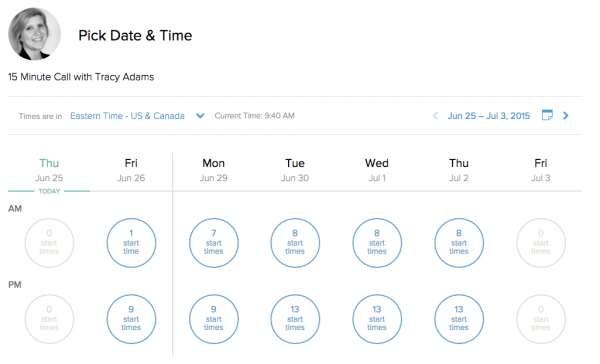
Calendly comes with the ability to pair up with your Google calendars. This allows you to block yourself off on specific times of the day. It also removes the possibility of every getting double booked for a call or an appointment.

I have all of my call appointments automatically added to a singular calendar due to wanting them to be a different color by default. However, when Calendly looks to see if I am available to schedule an appointment, it looks at multiple calendars that I have assigned to it.Screen Shot 2015-06-25 at 9.40.38 AM

Appointment openings

Along with blocking out your specific calendars to accommodate appointments being schedule, you’re able to do even more within your meeting settings! Most importantly, you’re able to have certain windows open for people to schedule within. Aside from that, you are able to limit the number of appointments that can be scheduled in a single day. Not to mention, for every appointment, you can give yourself an additional buffer time before and after, just in case things run behind (as you know, is totally possible!).

Cancellations

Clients have the ability to cancel their appointments with you with a click of a button, automatically notifying you and making the appointment time available for others again. It also works the other direction, let’s say you find yourself unable to come to work due to sickness and have appointments already scheduled, you can give them a much easier heads-up that you won’t be able to attend.

Reminders

Reminders are sent to you clients regarding your appointment with them so that they are less likely to forget. This is probably one of my favorite features.

Down to Business

You’re able to set specific questions so that you’re more prepared for your meetings. For my own personal Calendly, I make sure to ask what the call will be about and what their preferred contact number is. This enables me to get into the right frame of mind prior to contacting the client…making the experience better for both of us.

No More Phone Tag

How much time do you think you’ve wasted by emailing back and forth to set appointments or, better yet, trying to return voicemails just to end up leaving one in return? This is probably the best part of Calendly. Being able to send someone a link so that they can schedule with you around your schedule is a huge benefit in our every day work process.

Upgrade for More Options

Upgrading to their premium option allows for a number of additional features. One of which is the option for separate appointment types rather than the singular option with the free version. When you sign up for your account, you’re given a trial of premium, to give you a taste. Your two default appointments types are 15 minutes and 30 minute long appointments. For more information, I’d definitely suggest reaching out to them directly.


I love Calendly, it’s made it easier to connect with our clients and removes the main focus of frustration. Id you schedule appointments, give it a try!

Yoast SEO social vs. JetPack Publicize

The question has been posed as to what the benefits and drawbacks would be when putting Yoast SEO’s Social up against Jetpack’s Publicize feature. I wanted to take the opportunity to explain each and what they do. Both features within their respective WordPress plugins are very important when doing social media marketing of your blog’s content. So, let’s explore what they can do for us.

Yoast SEO

This plugin is a huge asset when it comes to properly setting up your posts, pages, and entire website to better increase your search engine optimization.  It incorporates everything from a snippet editor and real time page analysis functionality that helps you optimize your pages content, images titles, meta descriptions and more to XML sitemaps, and loads of optimization options in between.

Yoast SEO’s social area

The social area within the Yoast SEO plugin can easily be enabled by connected your social networks in place under the plugin’s social settings area. This will open up the ability to customize how links to your posts and pages display within Facebook, Twitter, and Google+. You’re able to control everything from the Title shown to the photo that pops up when shared. This plugin is important to utilize because social enthusiasts regularly decide to click on the “good-looking” shares that end up in their feed.

We all know that with some of our blog posts, random photos have the opportunity to be displayed depending on where they’re located on the website when we are sharing them. This helps put the power into your control so you can make the decisions in how your site is marketed.

Jetpack

Jetpack is an incredibly robust plugin that connects a self-hosted WordPress website to the features enjoyed on WordPress.com. These features include everything from tiled mosaic photo galleries to a Facebook feed for your blog’s sidebar. Most importantly to this article is the Publicize feature that becomes available to you.

Jetpack’s Publicize feature

Publicize makes it easy to share your site’s posts on several social media networks automatically when you publish a new post.

Automating your social sharing upon the Publish of a blog post takes the guess work of whether or not people know that you’ve added new content. It’s important to let your fan/followers know when you’re creating new posts because that content is usually for them anyways. So, why not give them a heads up?

With the Publicize feature, you’re able to customize which of the 6 following social networks your information gets shared out to automatically: Facebook (Profile or Page), Twitter, Linkedin, Tumblr, Path, and Google+. This makes it easy to market your content right away to your target demographic, giving them the chance to also share your information to their friends and followers, too.

So, Which do you use?

So, essentially, it isn’t quite fair to put these two plugins’ features up against each other. To get the best out of your social media marketing, they are best when used in conjunction with each other.

Utilize Yoast SEO’s social area to manage how your information is displayed when shared through social media networks while allowing Jetpack’s Publicize feature to automatically distribute when you Publish and you’ll be set!